Blog
How to Choose the Ultimate Budget Gaming Laptop in Dubai: The 2026 Strategy Guide
The gaming landscape in the UAE is growing faster than ever. From competitive esports arenas in Downtown Dubai to casual setups in student dorms at Dubai Knowledge Park, PC gaming has firmly established itself in the local culture. However, with next-generation game engines pushing hardware to its limits and global component shortages driving up the cost of premium tech, finding the perfect balance between price and performance can feel like an uphill battle.
Many local gamers believe they need to spend an absolute fortune to enjoy smooth frame rates and high-fidelity graphics. Fortunately, that is no longer the case. By entering the market with the right hardware knowledge and knowing where to source verified pre-owned or open-box hardware, you can secure an incredible budget gaming laptop dubai style without breaking the bank.
In this definitive 2026 guide, we will break down exactly how to evaluate entry-to-mid-range gaming hardware, avoid common performance bottlenecks, and explain why upgrading your mobile battle station with Aygro is the smartest move for your wallet.
Why This Matters: The Changing Economy of Portable Gaming
PC gaming hardware has undergone a massive evolution over the last few years. In the past, choosing a budget-friendly gaming machine meant making severe sacrifices—you had to settle for heavy, plastic bricks with terrible screen displays, loud fans, and graphics cards that became obsolete within a single year.
In 2026, the baseline for entry-level components has risen dramatically. Thanks to breakthroughs in AI-driven frame generation, intelligent power distribution, and highly efficient architectural designs from major chipmakers, modern entry-level graphics processors can comfortably handle modern AAA titles at high settings.
For students balancing academic assignments with evening competitive matches, or young professionals looking for a dual-purpose workstation, the budget-friendly gaming tier offers unprecedented value. The real challenge isn't finding low-cost options; it's identifying which hardware configurations give you actual, long-term performance value versus what will leave you lagging behind.
Exceptional Price-to-Performance Ratios: Premium flagship laptops often suffer from a rule of diminishing returns. Spending double the money rarely yields double the frame rate. Budget-tier laptops sit perfectly at the sweet spot of the value curve, offering roughly 75-80% of the raw performance of a flagship machine at less than half its retail price.
The Ultimate Multi-Tasking Workhorse: A laptop built to handle heavy 3D rendering and fast-paced gaming physics handles everyday work with absolute ease. These devices feature robust cooling systems, multi-core processors, and high-speed memory that make them excellent tools for video editing, coding, architectural modeling, and intense multitasking.
Access to Cutting-Edge Software Upscaling: Modern titles rely heavily on intelligent software to boost visual performance. Even lower-cost graphics cards now utilize advanced upscaling tools like NVIDIA DLSS (Deep Learning Super Sampling) and AMD FSR (FidelityFX Super Resolution), allowing a budget machine to match the visual output of older high-end hardware.
Greater Financial Freedom for Your Setup: Saving thousands of Dirhams on your primary laptop unit frees up your budget to invest in a complete, premium ecosystem. You can allocate those savings toward a high-refresh-rate external gaming monitor, a mechanical keyboard, a precise esports mouse, or expanding your digital game library.
The Complete Buying Guide: Matching Hardware to Your Gaming Style
To ensure you don't overspend on features you don't need—or accidentally bottleneck your system—you must look at the specific hardware components inside the chassis. Use this structural breakdown to navigate your options:
1. The Core Engine: GPU and CPU Selection
The Graphics Processing Unit (GPU) is the single most important component in a gaming rig. Unlike storage or memory, you cannot upgrade a laptop’s GPU later on.
The Baseline Standard: Look for at least an NVIDIA GeForce RTX 3050 or RTX 4050, or an AMD Radeon RX 6600M. These chips feature dedicated hardware for ray tracing and AI frame generation.
The Processor Pairing: Match the graphics card with an Intel Core i5 (11th Gen or newer) or an AMD Ryzen 5 processor. Try to avoid older quad-core chips, as modern games require at least six physical cores to run smoothly without stuttering.
2. Memory and System Storage
Running out of system memory causes severe frame drops, while slow mechanical hard drives lead to agonizingly long loading screens.
System RAM: Make 16 GB of RAM your absolute minimum standard. While some entry-level laptops are still sold with 8 GB of RAM, modern games and background apps will quickly overwhelm it.
Solid-State Storage: Insist on a Solid-State Drive (SSD) using the NVMe protocol with at least 512 GB of space. Avoid traditional hard disk drives (HDDs) entirely, as modern game engines require the rapid read/write speeds of an SSD just to load textures in real time.
3. Display Performance and Cooling Efficiency
A powerful graphics card is useless if it is paired with a slow, low-quality screen or if the laptop overheats within ten minutes of starting a game.
Refresh Rate: Never buy a gaming laptop with a standard 60Hz display. Insist on a panel that offers at least a 120Hz or 144Hz refresh rate, which makes fast-paced motion look incredibly fluid and responsive.
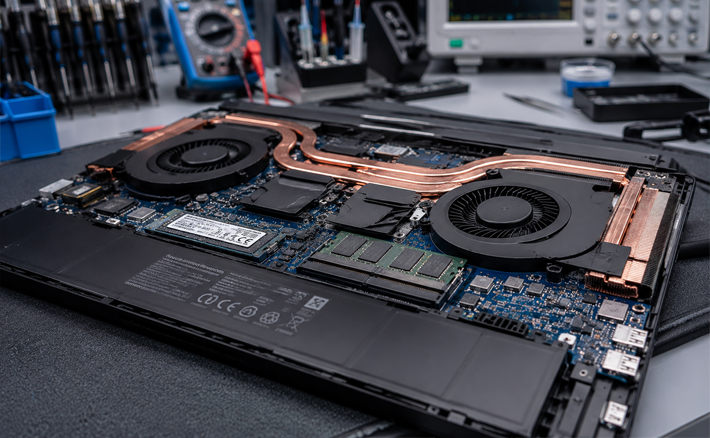
Thermal Design: Look closely at the ventilation layouts. A reliable machine should feature pronounced intake vents on the bottom and large exhaust ports on the sides or back to keep internal temperatures stable under heavy workloads.
Budget Gaming Performance Expectations in the UAE Market
To help you shop with confidence, we have outlined what you can expect from different price tiers across the local digital marketplace:
| Budget Tier (AED) | Common Hardware Configuration | Ideal Performance Targeting |
| AED 1,500 – AED 2,200 | Intel Core i5, 8GB/16GB RAM, 512GB SSD, GTX 1650 or RTX 3050 | Smooth 1080p gaming for competitive esports titles (Valorant, Fortnite, League of Legends) at high frame rates. |
| AED 2,300 – AED 3,200 | Intel Core i5/i7, 16GB RAM, 512GB/1TB SSD, RTX 4050 or RX 7600S | High-settings 1080p gaming on modern AAA titles (Cyberpunk 2077, GTA V, EA FC) utilizing DLSS frame generation. |
| AED 3,300 – AED 4,500 | Intel Core i7 or Ryzen 7, 16GB/32GB RAM, 1TB NVMe SSD, RTX 4060 | Premium mid-range performance, capable of running demanding titles at maximum settings and handling heavy content creation. |
5 Common Mistakes to Avoid When Shopping for a Gaming Laptop
When searching for the best deals on a budget gaming laptop in Dubai, keep an eye out for these frequent traps:
Chasing Cheap Deals on Unverified Online Classifieds: Buying a complex gaming rig from an unverified individual in a casual public space gives you zero consumer protection. Gaming laptops operate under high thermal stress; if the internal cooling system or graphics chip fails two days later, you have no way to recover your money.
Sacrificing the Display Refresh Rate for a Cheaper Price: A low price tag can make a 60Hz screen tempting, but running a high-performance graphics card on a slow display creates a major bottleneck, resulting in visible screen tearing and choppy motion.
Buying Outdated Graphics Cards to Save Money: Avoid laptops using older NVIDIA GTX 10-series or 16-series cards unless your budget is extremely tight. These older architectures lack modern AI upscaling features, meaning they will struggle to run newer games.
Overlooking Internal Upgrade Options: Many manufacturers solder components directly onto the system board to save space. Always check whether the laptop features an open slot to add an extra SSD or upgrade the RAM down the line as your games require more space.
Ignoring Fan Noise and Heat Thresholds: Some budget designs save on costs by using cheap, single-fan cooling setups. Make sure to read hardware reviews or test the device under a heavy load to ensure it doesn't get loud enough to ruin your experience or cause performance drops due to overheating.
Expert Tips for Testing Hardware In-Store
If you are inspecting a pre-owned or open-box gaming laptop in person, use this professional checklist to ensure the device is in top-tier shape:
Examine the bottom and sides of the laptop for any signs of physical impact or blocked exhaust fins. Ensure the screen hinges are sturdy, as gaming laptops are often opened and closed frequently, which can cause wear on the casing over time.
Navigate directly to the advanced display settings within the operating system to confirm the panel is actively running at its advertised 120Hz or 144Hz rate. Pull up a solid color background to check for dead pixels or uneven bright patches.
Launch a demanding benchmarking utility or a graphic-heavy game loop for at least three to four minutes. Listen carefully to the internal cooling fans to ensure they spin up smoothly without making any rattling or grinding noises that indicate worn-out bearings.
Open a text editor or keyboard testing tool and press multiple keys simultaneously. Ensure every single key registers instantly and that the backlighting or RGB zones work uniformly across the entire layout.
Plug the power brick into the charging port and gently move the cable around to ensure the internal connection remains stable. Check the operating system's battery diagnostics to make sure the cells haven't been degraded by excessive charging.
Final Thoughts: Level Up Safely and Smartly
Finding a reliable budget gaming laptop in Dubai doesn't mean you have to gamble with your hard-earned money on sketchy online forums or settle for substandard, sluggish machines. By focusing on critical components like an RTX-series graphics card, a fast NVMe SSD, and a high-refresh-rate display, you can secure an incredible gaming setup at an affordable price.
At Aygro, we remove all the risk from shopping for new, open-box, and certified pre-owned gaming gear. Every single system in our inventory goes through rigorous multi-point stress tests, meticulous internal cleanings, and comes backed by a trustworthy local warranty. Whether you are aiming to climb the competitive ranks in your favorite esports title or need a high-performance machine for your creative studies, we have the perfect setup waiting for you.
Explore our collection of verified gaming laptops today, or send our tech experts a message on WhatsApp for personalized advice tailored directly to your budget and favorite games!
Frequently Asked Questions (FAQs)
Is 8 GB of RAM enough for a budget gaming laptop in 2026?
While 8 GB of RAM can handle older titles and lighter esports games like CS:GO or League of Legends, it is not recommended for modern gaming. Most current titles require at least 12 GB just to load assets efficiently. For smooth performance and reliable multitasking, you should look for a machine with at least 16 GB of RAM, or ensure the laptop has an open slot so you can upgrade it later.
Can I change or upgrade the graphics card inside my gaming laptop down the road?
No, the graphics card (GPU) and central processor (CPU) are soldered directly onto the laptop's main motherboard in almost all modern designs. Because you cannot upgrade these core components later, you should always prioritize buying the best graphics card your budget allows right from the start.
Why do gaming laptops have shorter battery lives compared to standard office laptops?
Gaming laptops are built with high-performance components designed to process complex 3D graphics and heavy workloads, which naturally draw a lot of power. Even when you aren't gaming, features like high-refresh-rate screens use more energy. For the best performance, you should keep your laptop plugged into the wall while gaming, and adjust your power profiles to energy-saving modes when using it for regular tasks on the go.
What is the advantage of an NVIDIA RTX card over an older GTX card?
NVIDIA RTX cards feature specialized, dedicated hardware cores built specifically for ray tracing (realistic lighting and shadows) and AI tasks. This grants you access to DLSS (Deep Learning Super Sampling), an advanced software feature that uses AI to render games at a lower resolution and upscale them sharply in real time. This gives you a massive boost in frame rates without sacrificing visual quality—a feature older GTX cards simply cannot support.
Is it safe to buy a pre-owned or open-box gaming laptop?
It is completely safe if you buy from a verified, reputable dealer that thoroughly inspects their inventory. Because gaming rigs run under high heat and heavy workloads, you should avoid buying from unverified private sellers where you can't verify how well the device was maintained. Sourcing your machine from a professional vendor like Aygro ensures your laptop has been professionally cleaned, tested, and comes with a reliable warranty for peace of mind.